
Table of Contents
1. AdSense Tax-Residency information update reminder

2. Google AdSense agreement content
2.1 How to check the Google contracting entity information
After logging in to AdSense, you can find the entry for this query at the bottom of the homepage under “Terms.”

Then, in the first section of the Terms, look for the corresponding Google entity information.

In this example, the corresponding contracting entity is:
Google help :
Google LLC
Google Ireland
Google Advertising (Shanghai) Company Limited
Google Asia Pacific Pte. Ltd.
The further tax-related information of the contracting entity is:
Google Asia Pacific Pte. Ltd.
Mapletree Business City II
70 Pasir Panjang Road, #03-71
Singapore 117371
GST 号为 200817984R。
2.1 Downloading the Google AdSense Service Agreement Terms
The original English text is translated into Chinese and converted into a PDF file. You are welcome to use our AI Agent, which provides you with a professional translated version.

3. Issuance of the Certificate of Chinese Tax Resident Status (Individual Version)
Description of the Certificate of Tax Resident Status service:
In order for an enterprise or individual to enjoy treaty benefits under:
- Tax treaties signed between the Chinese government and other foreign governments;
- Tax arrangements signed between Mainland China and Hong Kong/Macau;
- Tax agreements signed between Mainland China and Taiwan;
- Tax clauses in aviation agreements;
- Tax clauses in maritime agreements;
- Tax clauses in motor transport agreements;
- Agreements or exchanged letters on mutual exemption of tax on international transport income,
the enterprise or individual may, for any calendar year in which they qualify as a Chinese tax resident, apply to the competent tax authority for the issuance of a “Certificate of Chinese Tax Resident Status”.
The following procedures use the latest policies of the Shenzhen Tax Bureau as an example.
At present, the Shenzhen Tax Bureau has moved the web-based application entry. The latest online application entrance is located here and must be opened in the WeChat client to complete account login and authentication.
After logging in, the webpage interface for issuing the Certificate of Chinese Tax Resident Status is as follows:

3.1 List of documents required for online application
“Application Form for Certificate of Chinese Tax Resident Status”
Supporting documents such as contracts, agreements, board or shareholder resolutions, payment vouchers, etc.
“Explanation of Inability to Handle via the Electronic Tax Bureau”
3.2 Contents to be filled in the Application Form for Certificate of Chinese Tax Resident Status
Template of the Application Form for Certificate of Chinese Tax Resident Status: official download

Details are as follows:
Treaty article to be enjoyed:
Independent personal services
Name of competent tax authority:
State Taxation Administration XX City XX District Taxation Bureau
Contracting counterparty country/region:
Republic of Singapore
Name of the counterparty taxpayer:
Fill in according to the actual contracting entity in your AdSense terms. For example:
In English: Google Asia Pacific Pte. Ltd.
In Chinese: 谷歌亚太私人有限公司
Name of the treaty to be enjoyed:
Agreement between the Government of the People’s Republic of China and the Government of the Republic of Singapore for the Avoidance of Double Taxation and the Prevention of Fiscal Evasion with respect to Taxes on Income
3.3 Latest application entry interface for the Certificate of Chinese Tax Resident Status

4. Issuance of the Certificate of Chinese Tax Resident Status (Corporate Version)
The following procedures use the latest policies of the Shenzhen Tax Bureau as an example.
After logging into the corporate account, go to “Regional Features” and, under the “Issuance of Certificates” section, select “Certificate of Chinese Tax Resident Status.”
5. Obtaining the Certificate of Tax Resident Status
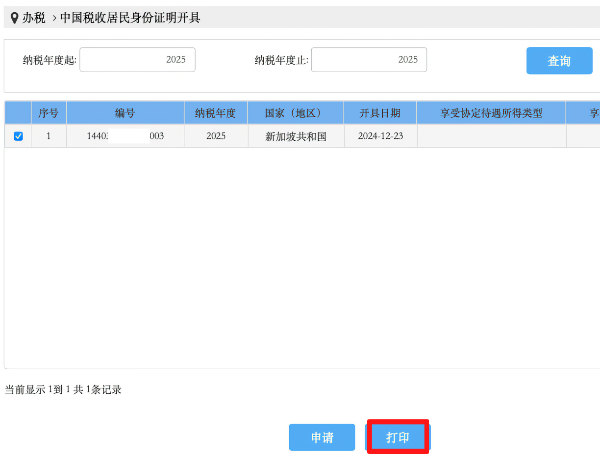
The electronic certificate is issued instantly. Click the print button and save it as a PDF file.
6. Updating tax information in AdSense
